How to check index on Google?
Ensuring that your website is indexed is crucial for visibility. Without it, you don't exist in search results. Below, we explore three ways to check your Google index status - from a quick manual check to a full index check on Google for hundreds of pages at once - plus how to force indexing and fix common errors.
There are three ways to check if a page is indexed by Google: the site: search operator for a single URL, the URL Inspection Tool in Google Search Console for pages you own, and a bulk index checker for whole lists. Only a bulk checker scales past a handful of URLs and verifies against more than one Google datacenter.
How do the three ways to check Google index status compare?
| Method | Bulk (up to 50,000 URLs) | Second-datacenter re-check | Works on third-party backlinks | Best for |
|---|---|---|---|---|
| IndexChecker | Yes - CSV, TXT or sitemap | Yes - every "Not Indexed" result | Yes, any URL | Whole link lists, repeat monitoring, client reports |
| site: operator | No - one URL at a time | No - single datacenter | Yes, but manual | Spot-checking one or two links |
| Google Search Console | No - per-URL inspection | Not applicable | No - only verified properties | Your own pages, authoritative status |
What is Google indexing?
Google indexing is the process by which Google collects, processes, and stores data from your website. When a page is indexed, it becomes eligible to appear in search queries. Google uses bots (crawlers) to discover pages, evaluate their relevance, and rank them accordingly.
What are the 3 ways to check if a page is indexed?
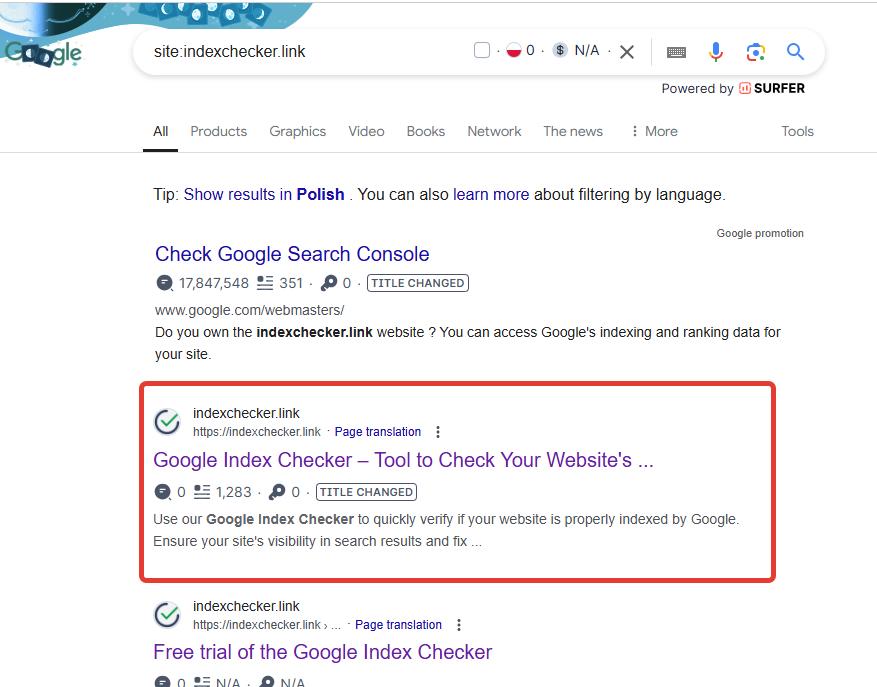
Site Search Method (Quickest)
Type the following command in Google Search:
If your site appears in results, Google has indexed it. This method is fast, but it's known to be unreliable across Google's datacenters - a page can appear indexed from one location and not from another, which is exactly the false-negative problem a proper bulk index check on Google is built to solve.
Google Search Console (Official)
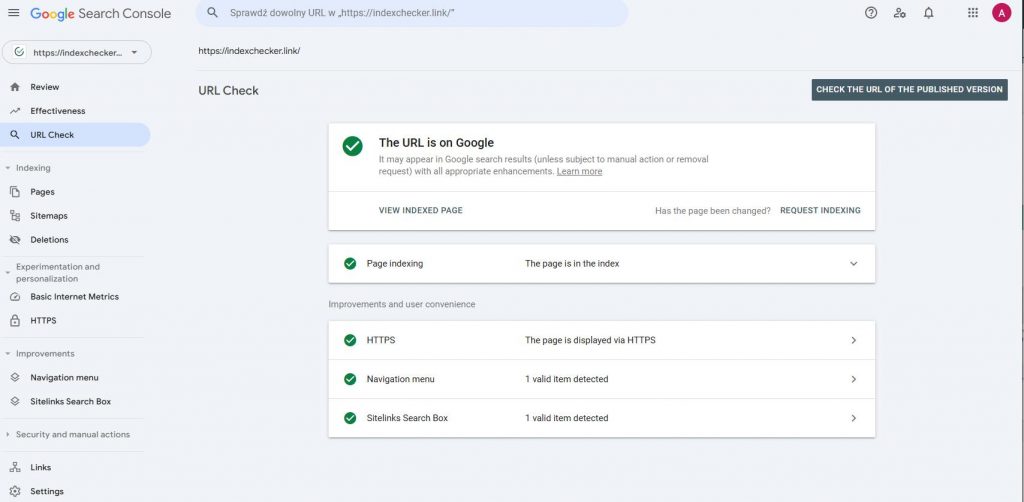
- Log in to Google Search Console.
- Navigate to the URL Inspection Tool.
- Enter your URL. Look for "URL is on Google".
Bulk Index Checkers (For Pros)
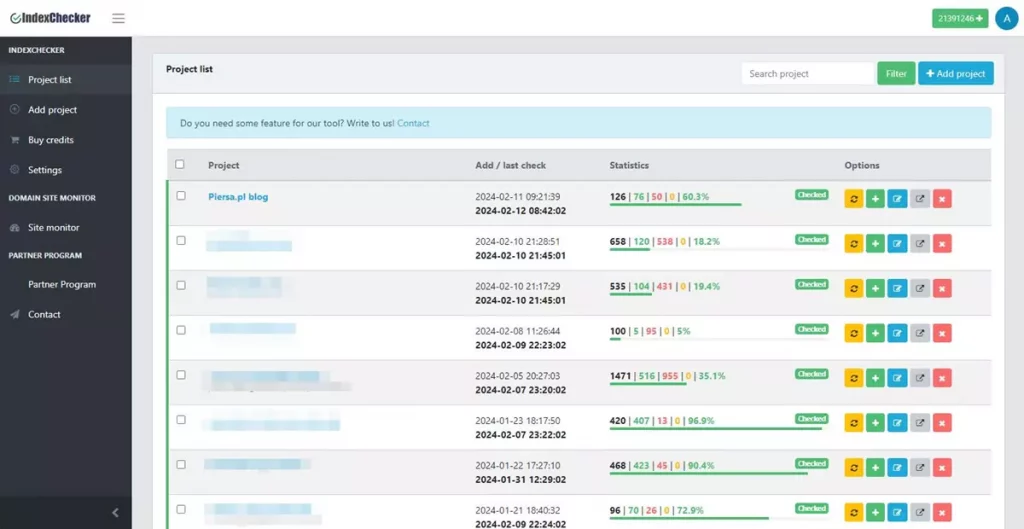
Site search and GSC work fine for a single page, but neither scales past a handful of URLs. To check index status on Google for hundreds or thousands of pages at once - the situation most SEO agencies actually face - use a bulk index checker that verifies every URL against two separate Google datacenters before reporting a page as not indexed, so you don't delete a backlink that's actually live.
How do I enable Google indexing?
If your page isn't indexed, follow this checklist to force Googlebot to crawl your site:
Verify Crawlability
Check robots.txt to ensure the page isn't blocked. Add <meta name="robots" content="index, follow">.
Submit via GSC
Use the URL Inspection Tool in Google Search Console to manually request indexing.
Submit Sitemap
Submit your sitemap.xml in GSC to help Google find all your important pages.
Build Backlinks & Quality
Quality content and backlinks from other sites prompt Google to crawl faster.
What common issues stop a page from being indexed?
Blocked by Robots.txt
Ensure critical pages aren't disallowed in your robots.txt file.
Noindex Tag
Remove noindex meta tags from pages you want to appear in search.
Duplicate Content
Google skips duplicates. Use canonical tags to signal the main version.
Thin Content
Pages with little value may not be indexed. Add comprehensive content.
How to check domain index?
Checking a domain's overall status helps assess site health.
- Bulk Checks: Use a bulk index checker for large datasets - up to 50,000 URLs per batch.
- Coverage: Check the "Pages" report in GSC.
- Site Search: Perform
site:domain.comto see total indexed count. - Backlinks: Use backlink index tracking to see which of your links are still indexed over time.
Frequently Asked Questions
How do I check the Google index status of my page?
Use the site:yourdomain.com/page-url search, check the URL Inspection Tool in Google Search Console, or run a bulk index check if you need to verify many pages at once.
What is the fastest way to check index status on Google for a whole site?
Export your sitemap URLs and run them through a bulk index checker. It is far faster than checking each page individually with the site: operator or GSC's URL Inspection Tool.
Is the site: search command 100% accurate for checking Google's index?
No. The site: operator queries a single Google datacenter, which can return a false "not indexed" result if that specific datacenter has not propagated the page yet. A proper index check should verify against more than one datacenter before reporting a page as not indexed.
Can I check if my page is indexed without Google Search Console?
Yes - the site: search command works without any account, and third-party index checkers do not require Search Console access either. GSC remains the most authoritative source, but it is not the only option.
Why does a page show as indexed one day and not indexed the next?
This is usually a propagation gap between Google's datacenters, a content quality re-evaluation, or a crawl budget cut on low-priority pages. Re-checking the page and comparing it to your previous check is the most reliable way to confirm whether it actually dropped.
Track Your Indexing Status Over Time
Understanding indexing is vital. Pages can drop out of the index over time. Re-check your site's pages regularly using a proper index checker instead of relying on a single site: search.
Start Checking for FreeIndexChecker is a bulk Google index checker operated by AP2Media Sp. z o.o., a registered EU company based in Czerwin, Poland (VAT ID PL7582396091). It is used in production on the company's own SEO projects, including the local-SEO service drukujemy3d.pl, and has verified more than two million URLs for its customers in the last 30 days.
The official Google documentation behind how indexing works and how to check it.