System Operational · 738,778 URLs verified in the last 30 days
Google Index Checker Tool
for Bulk URL Verification
Check if your pages are indexed by Google, in bulk or one by one. Our
Multi-Datacenter Verification confirms every "Not Indexed" result from a
second Google datacenter before reporting it - a re-check that recovers roughly
5% of URLs the first datacenter reported as missing, so you never delete a
backlink that is actually live.
Get 50 free credits on sign up - no credit card required.
app.indexchecker.link/dashboard
Indexing Rate · Last 30 Days
48%
+ API Connected
.../best-seo-tools-2025
INDEXED
.../guest-post-marketing
NOT INDEXED
.../new-backlink-profile
CHECKING...
Check if a page is indexed by Google
Paste your list below. We will validate it instantly, then a free account
(50 credits, no credit card) runs the actual index check.
Every "Not Indexed" result in IndexChecker is re-checked against a second Google datacenter before it
is reported. How index checking works.
Operated by AP2Media Sp. z o.o. - a Registered EU Company
Google Cloud
Rest API
CSV Reports
SSL Secure
99.9% API Uptime
Live System Stats
Live Google Index Check Statistics
Operating since 2021 · Last updated: Nov 7, 2026, 4:16 PM
26,040
Checks Today
71,713
Checks / Last 7 Days
738,778
Checks / Last 30 Days
100M+
Total Checks Tracked
IndexChecker verified 738,778 URLs in the last 30 days.
357,173 of them were found in Google's index -
an indexing rate of 48% across all customers.
In short
IndexChecker is a bulk Google index checker that verifies whether your pages and backlinks are in Google's index - up to 50,000 URLs per CSV file, at 400-500 URLs per minute. Every "Not Indexed" result is re-checked against a second Google datacenter, which recovers roughly 5% of URLs the first datacenter reported as missing. Credits never expire and 1 credit checks 1 URL.
Written by
Adam Piersa,
Founder of IndexChecker
·Reviewed and updated
What Is a Google Index Checker?
A Google index checker is a tool that verifies whether a URL is present in the
Google index - meaning the page can appear in search results at all. Index checking matters
because a page that the search engine has crawled is not automatically a page the search engine
has indexed, and only indexed pages earn organic traffic. IndexChecker checks each URL against
two independent Google datacenters (one in the USA, one in Europe) and reports
"Not Indexed" only if both confirm the page is absent.
People look for this under a dozen names - index checker, indexing checker, index check tool, or
simply "check index Google" - and they all describe the same job: asking Google whether a given
page is in its index right now. The answer changes over time, which is why a single index check
on Google tells you less than a check you can repeat and compare against the previous run.
That second pass is the point of the tool. Across our own traffic, the re-check finds roughly
5% of URLs that the first datacenter reported as missing - false negatives that
a single site: query, a browser extension, or a cheap single-server index checker
tool would have handed you as fact. Acting on those results means deleting live backlinks and
paying to re-index pages that were never gone.
Indexing is also not permanent. Google drops pages from its index after a content quality
review, a crawl budget cut, or a technical problem on the page, and a link that is not indexed
passes zero SEO value even while it stays live and clickable. IndexChecker checks index status
in bulk, monitors backlinks for de-indexing over time, and can resubmit dropped URLs to a
connected indexing service. If you want the manual methods first, our guide on
how to check index on Google
walks through the site: operator, Search Console and bulk index checkers, and where
each one gives you wrong answers.
How does IndexChecker compare to manual index checks?
The three common ways to check Google index status differ mainly in how many URLs they handle
and how reliable the answer is. Use the site: operator to spot-check one link, Google Search Console for pages you own, and a bulk index checker for whole lists.
Method
Bulk (up to 50,000 URLs)
Second-datacenter re-check
Works on third-party backlinks
Best for
IndexChecker
Yes - CSV, TXT or sitemap
Yes - every "Not Indexed" result
Yes, any URL
Whole link lists, repeat monitoring, client reports
site: operator
No - one URL at a time
No - single datacenter
Yes, but manual
Spot-checking one or two links
Google Search Console
No - per-URL inspection
Not applicable
No - only verified properties
Your own pages, authoritative status
Browser extension
Limited - small batches
No - single datacenter
Yes, but rate-limited
Occasional quick checks
IndexChecker is a bulk Google index checker operated by AP2Media Sp. z o.o., a registered EU company based in Czerwin, Poland (VAT ID PL7582396091). It is used in production on the company's own SEO projects, including the local-SEO service drukujemy3d.pl, and has verified more than two million URLs for its customers in the last 30 days.
Sources and references
The official Google documentation behind how indexing works and how to check it.
Every index check runs the same four steps, whether you submit one URL or fifty
thousand. The part that matters is the second one: a single datacenter can report a
page as missing when it simply has not propagated yet, so IndexChecker never reports
"Not Indexed" on one opinion alone. Throughput is 400 to 500 URLs per minute, and on
large client batches we have run around 300,000 URL checks in a single day.
Primary Check: IndexChecker queries Google from Data Center A (USA) using rotating residential proxies to mimic a real user.
Verification Trigger: if a URL comes back "Not Indexed," IndexChecker does not report it yet - a single datacenter can show a temporary cache gap.
Secondary Validation: IndexChecker queries Data Center B (Europe) and only marks a URL "Not Indexed" once both servers confirm its absence.
White-Label Export: results export to a clean CSV or TXT file, segmented into Indexed, Not Indexed, and Error - ready for client reporting.
Sending already-indexed links to a premium indexing service wastes budget. IndexChecker
filters your list first, so you only pay to index the links that actually need it.
Cost to check 1 URL at IndexChecker (Agency plan)$0.0013
Typical cost to index 1 URL via a 3rd-party indexer~$0.02
Send all 10,000 to an indexer, unchecked$200
Check first, then index only the 5,165 that need it
$116
Savings on a 10,000-link batch~$84
Based on the48%of URLs found in Google's index across all IndexChecker checks in the last 30 days - that is4,835links you would otherwise have paid to index for nothing.
Pages drop out of the index after a quality re-evaluation or a crawl budget cut, and a link
on a page that fell out silently stops passing SEO value while still returning 200 OK. It hits
link placements hardest: across the backlinks monitored in IndexChecker over the last 30 days,
42% were not found in Google's index. Our
backlink index checker
covers that side in full - ghost links, crawl budget cuts, and status-change reports between checks.
Real Data, Not Theory
Two Projects We Monitored: What Index Checking Actually Recovered
A page that isn't indexed is a dead node in your internal linking structure - it passes
zero context and zero link equity to the rest of your site. Here is what that looked
like on two projects we tracked ourselves.
B2B Manufacturing Client
Monitored via IndexChecker · 90-day period
44
Pages Indexed (Start)
68
Pages Indexed (After)
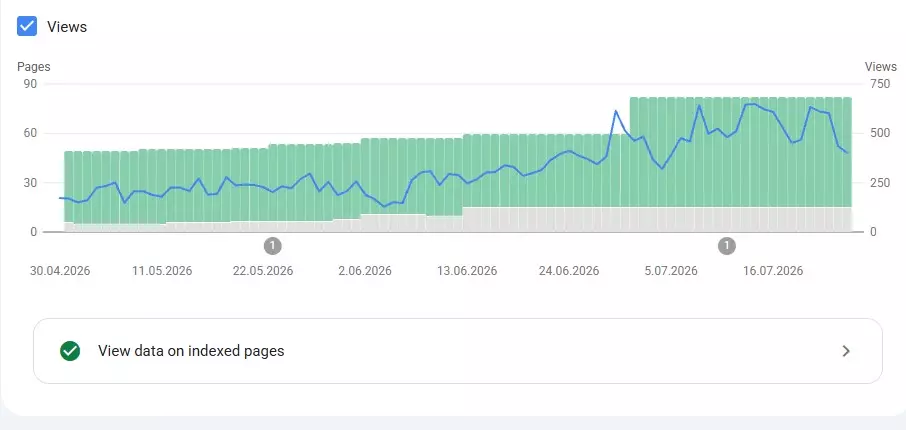
IndexChecker's monitoring flagged 24 pages and blog posts that were
live on the site but missing from Google's index - a +54% increase
in indexed pages once they were identified and resubmitted. Google Search Console
showed a corresponding upward trend in impressions over the same period, as the
newly indexed pages began passing internal link equity to the rest of the site.
Google Search Console, indexed pages over the 90-day monitoring period. The step
up follows the batch of 24 previously unindexed URLs being identified and resubmitted.
drukujemy3d.pl
One of our own projects
We run IndexChecker on our own local-SEO project: a 3D printing service with dozens
of city and service landing pages across Poland. Local SEO silos depend on internal
linking between city hubs and service pages - if a city page silently drops out of
the index, every page linking to it loses part of its path back to the hub.
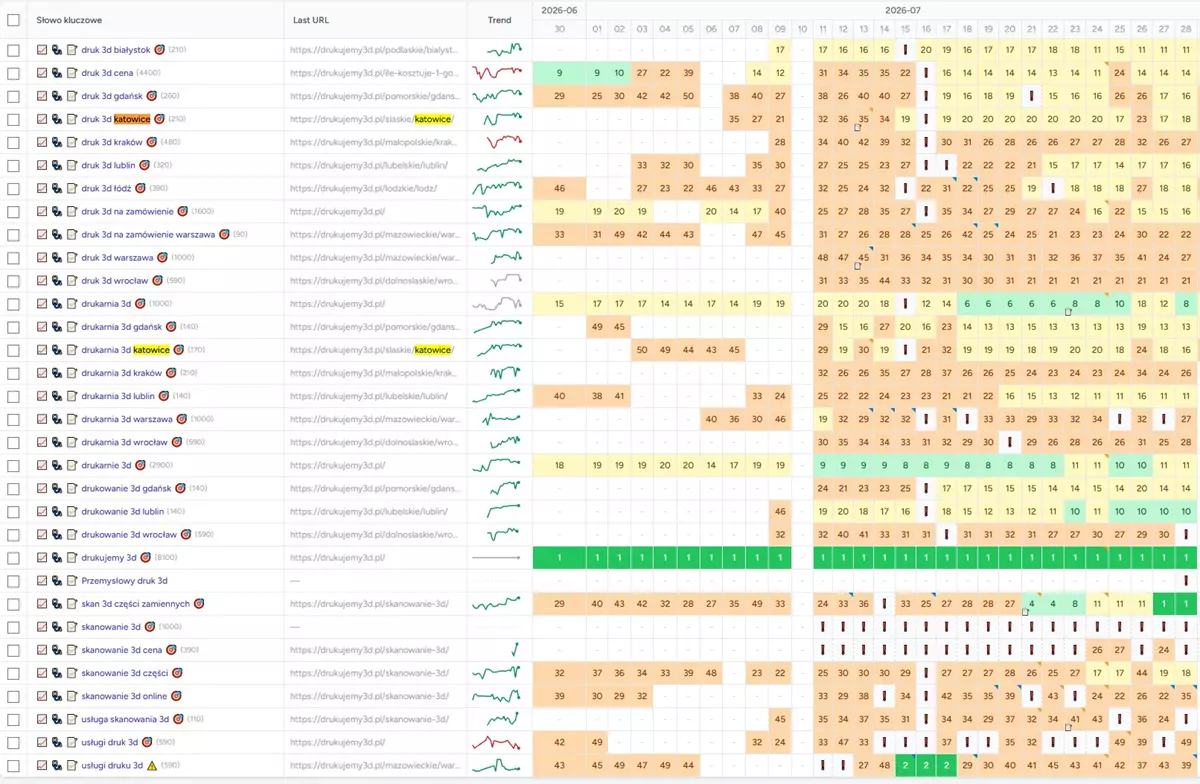
By continuously monitoring which pages were actually indexed and resubmitting the
ones that weren't, we kept the internal linking structure intact. Our own keyword
position tracking across dozens of city and service queries reflected the
improvement as re-indexed pages started passing link equity again.
Indexing status across the city and service landing pages of drukujemy3d.pl.
Each recovered page restores a link path back to its regional hub.
If even a fraction of your subpages are silently missing from Google's index, they're not
just invisible in search - they're breaking your internal linking structure for every page
that links to them. See how
backlink index status tracking
compares each re-check against the previous one and flags every link that moved in or out of the index.
Inside the Dashboard
What does IndexChecker look like inside?
IndexChecker runs entirely in the browser at app.indexchecker.link. You add a project, it
checks every URL against two Google datacenters, and you export or share the result. Here is
each step of that workflow in the real dashboard.
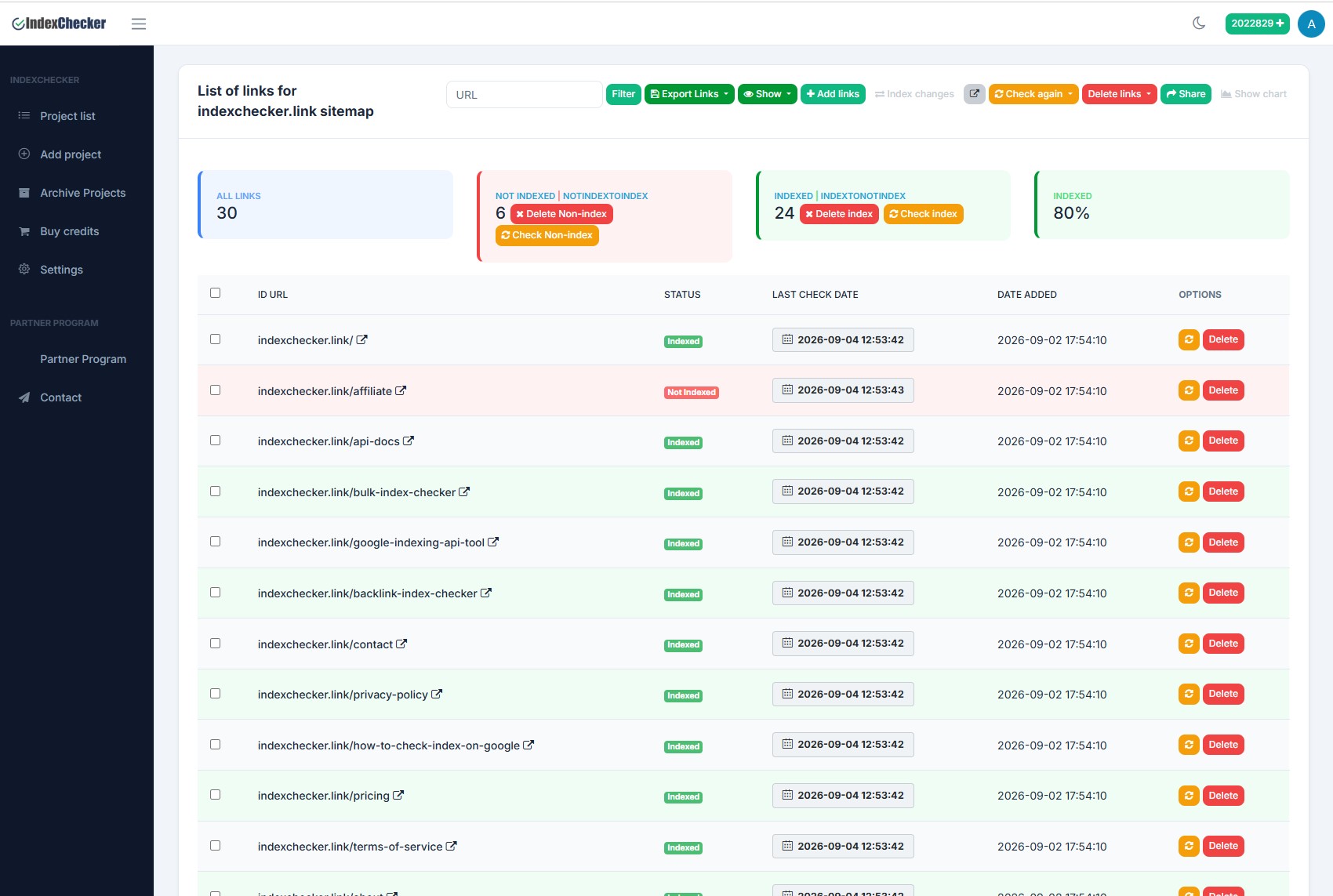
What does a project look like inside IndexChecker?
The project view lists every URL with its index status, last-check date and date added.
You see how many links are indexed, how many are not and the index percentage, re-check
all links, only the indexed ones or only the not-indexed ones, and delete links one by
one or in bulk. When a project has been checked more than once you can open an
indexation-over-time chart. The Share button generates a public report
link that opens without a login or account.
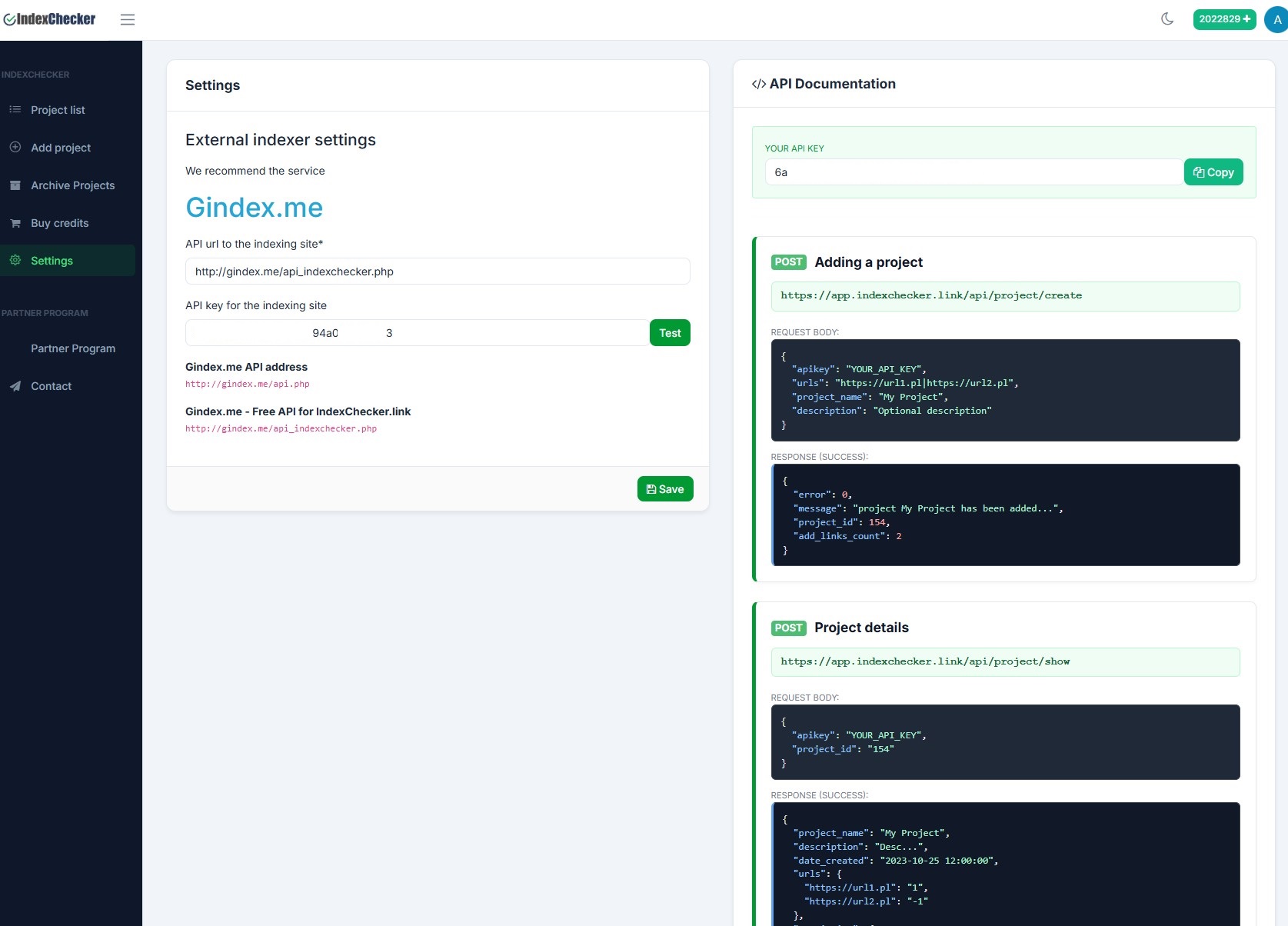
How do I connect an indexer or the API?
The Settings screen holds two things. On the left you configure an external indexer -
its API URL and key, with a Test button - so confirmed non-indexed URLs can be pushed to
it in one click. On the right is your own REST API: your API key plus documentation for
creating projects and reading their status programmatically, so IndexChecker fits into
your own scripts and dashboards.
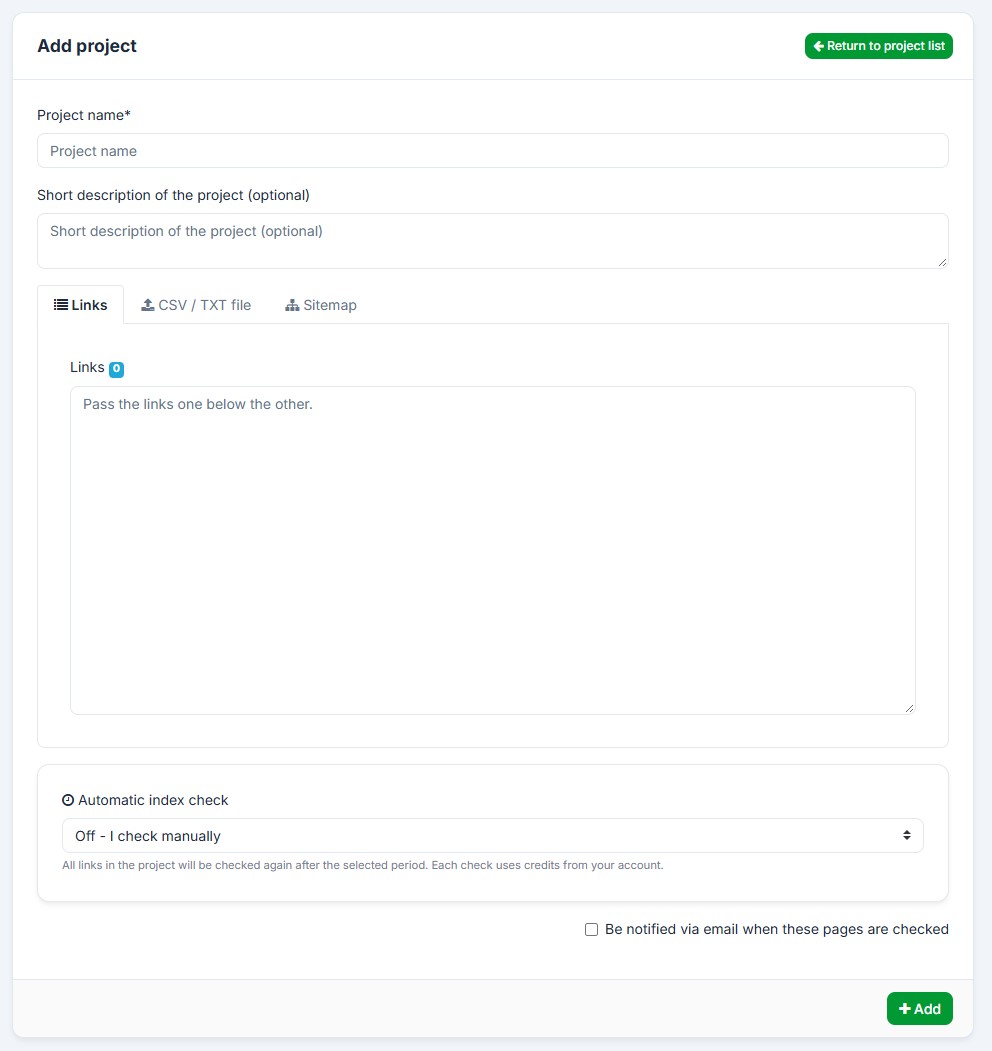
How do I add URLs to check?
You add a project three ways: paste the links straight into the box, upload a CSV or TXT
file, or point to a sitemap. Name the project, add an optional description, and set an
automatic re-check schedule so the whole list is verified again on a fixed interval -
each check spends credits from your balance. Opt in to an email report when a run finishes.
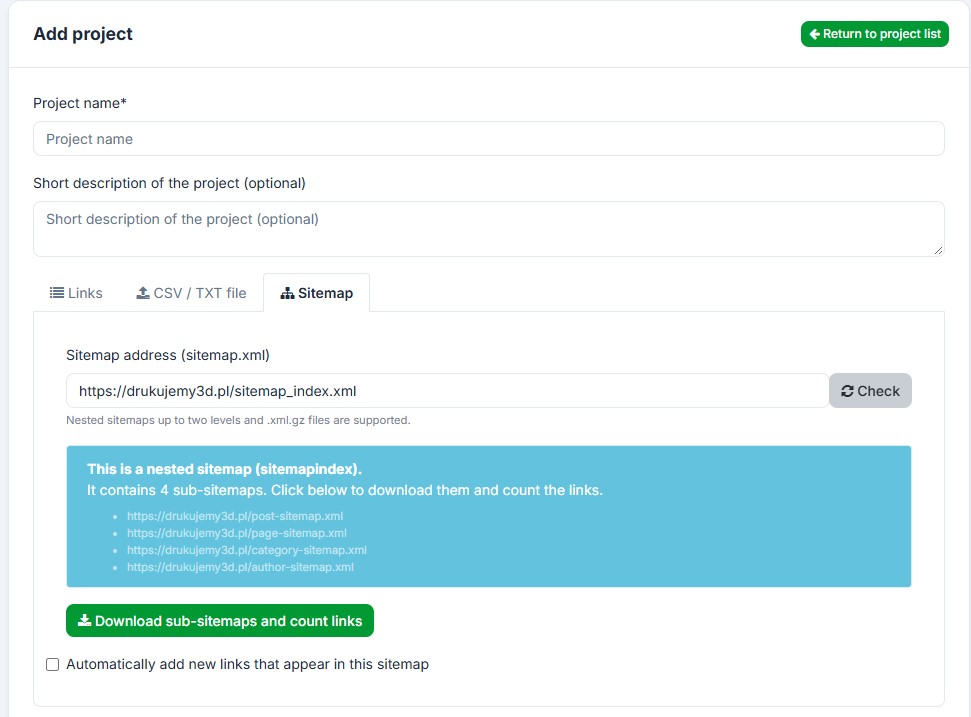
Can I check a whole sitemap at once?
Yes. Paste a sitemap URL and IndexChecker reads nested sitemaps up to two levels deep, including .xml.gz files. When the sitemap is a sitemap index it lists every
sub-sitemap and counts the total links first, so you know exactly how many URLs will be
added before you spend a credit. You can also let it automatically add new URLs that
appear in the sitemap later, on a schedule.
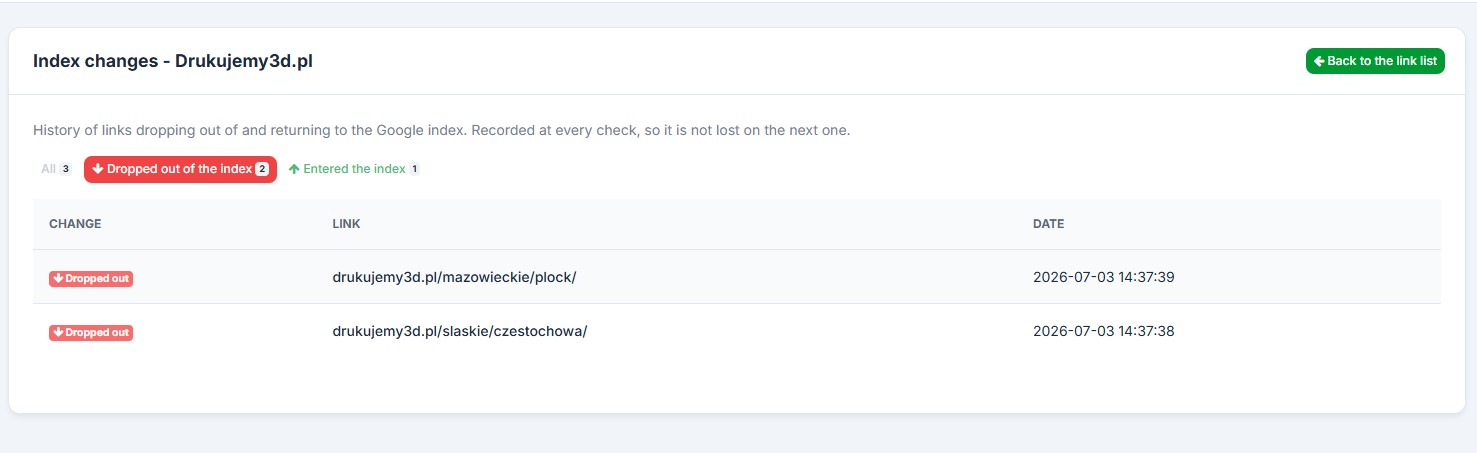
How do I see which links dropped out of the index?
The Index changes view records which URLs entered the Google index and which dropped out
of it. The change is saved at every check, so the history is never lost on the next run -
you can filter to only the links that left the index, only the ones that entered it, or
see all changes with the exact date of each.
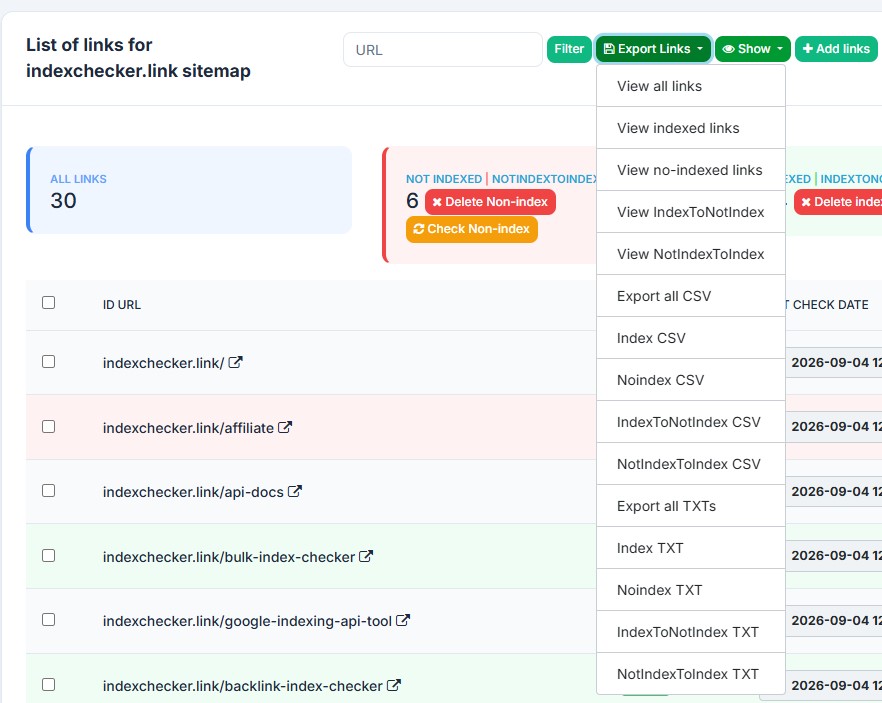
How do I export the results?
Export to a CSV or TXT file, or view the links directly in the browser to copy them.
Every export can be split into indexed, not-indexed or all links, plus the two
change lists - URLs that moved from indexed to not-indexed and the other way round -
so a white-label client report is one click away.
How do I send only non-indexed URLs to an indexer?
IndexChecker connects to any third-party indexer - including Omega and
SpeedLinks - through a universal API connector. IndexChecker checks
status first and separates "Indexed" from "Not Indexed" automatically -
then, with a single click, you send a link or an entire project's non-indexed URLs to
your connected indexer. Nothing is sent in the background: you decide what goes through
a paid indexer and what you'd rather submit yourself via Search Console.
Check Status: every URL in a project is checked against Google before any indexing request is sent.
Auto-Filter: already-indexed URLs are separated out automatically, so you never manually sort a spreadsheet.
One-Click Send: push a single link or the whole "Not Indexed" batch to your connected indexer whenever you choose.
Note: IndexChecker verifies index status - it does not index pages itself. Indexing
requests are fulfilled by your connected third-party indexer, which uses its own
separate credit balance.
curl -X POST https://app.indexchecker.link/api/project/create \
-d "apikey=YOUR_KEY" \
-d "urls=site1.com|site2.com"
_
Why do SEO professionals choose IndexChecker?
Everything you need to manage indexing at scale.
No Monthly Subscription
Purchase credits as needed, no recurring fees. 1 check = 1 credit. Credits never expire.
Multi-Datacenter Verification
Every "Not Indexed" result is re-checked from a second datacenter before it's reported, ruling out cache errors.
Indexer Integration
Connect your preferred third-party indexer (like Omega) and submit only confirmed dead pages, directly from your panel.
Email Notifications
Opt in to get notified by email as soon as your check finishes - with a full report of what's indexed and what isn't.
Full Check History
Every check is logged, so you can track the exact date a page was indexed - or de-indexed.
Export All Data
Export project statistics or the indexing status of individual pages to CSV or TXT for client reports.
Developer First
Does IndexChecker have a REST API?
Building your own SEO dashboard? Integrate IndexChecker directly into your workflow with
full access to Project Creation, Status Checking, and
Balance endpoints.
A page is "indexed" when Google has crawled it and added it to the database it serves search results from. An indexed page can appear in search results; a non-indexed page cannot, even if it is live and receiving direct traffic.
What is the difference between "Not Indexed" and "De-indexed"?
"Not Indexed" means Google has never added the page to its index. "De-indexed" means the page was indexed at some point and was later removed - usually due to a content quality signal, a technical issue, or a crawl budget cut after around 90 days of inactivity.
How long does it take Google to index a new page?
It varies from a few hours to several weeks, depending on the site's crawl budget, whether the page is in the sitemap, and whether it was submitted directly via Search Console or the Indexing API. Re-checking the URL in IndexChecker shows you exactly when it crosses into the index.
What are credits and how are they used?
Each credit corresponds to a single URL check. You spend one credit per page verified. Multi-Datacenter Verification (the second-datacenter re-check) is included in this cost - IndexChecker does not charge extra for it.
Do purchased credits expire?
No. Credits have no expiration date. Buy a larger package to get a lower per-URL price and use it over the next 12 months or longer.
Can I trust the accuracy of the results?
IndexChecker uses Multi-Datacenter Verification: if Data Center A reports "Not Indexed", Data Center B in a different location checks again before the result is finalised. That second pass recovers roughly 5% of the URLs the first datacenter reported as missing. Occasional false negatives can still occur if a URL has not yet propagated across all of Google's datacenters.
Which payment methods do you accept?
IndexChecker accepts instant payments via PayPal. Stripe payment links for credit cards are available on request - contact support if you cannot pay via PayPal.
Is VAT included in the price?
No, prices are net.
EU companies with a valid VAT number: 0% VAT (reverse charge).
Polish companies: standard 23% VAT applies.
Non-EU customers: no VAT added.
Is there an API available?
Yes. IndexChecker offers a full REST API for developers, with endpoints to check balances, create projects, and retrieve statuses programmatically. See the API docs.
What indexers do you support?
You can connect almost any third-party indexer - including Omega and SpeedLinks - via the API Connector. Those services require their own separate credits; IndexChecker handles the connection and the status verification, not the indexing itself.
Do you have an affiliate program?
Yes - a "Credits for Credits" referral system paying 10% commission. Create an account, then contact support via the dashboard to activate partner status.
Can I export my data?
Yes. Export all project statistics or the indexing status of every page in a project to a CSV or TXT file - ready for white-label client reports.
Ready to clean up your link lists?Check up to 50,000 URLs via CSV, or verify a handful via the dashboard.
Sign up now and get 50 free credits to test our accuracy against your current tool.